 Xero App Store Verified
Create batch payments in Xero from remittances, instantly
Remittance Go extracts every invoice reference from a remittance and creates a formal Batch Payment in Xero via the official API — regardless of volume.
No credit card required

Process Remittance Advices
Suitable for general remittances, NDIS remittances, and everything in between.
Process Remittance Advices
Suitable for general remittances, NDIS remittances, and everything in between.
Processing Queue
| Document | Status | Processing | Action |
|---|---|---|---|
abc-aged-care.pdf | In progress | Analyzing…(thinking) | Review |
services-jan.pdf | In progress | Pondering…(thinking) | Review |
my-caremanager-june.pdf | In progress | Whirring…(thinking) | Review |
ndis-june-remittance.pdf | Ready to review | …(thinking) | Review |
support-at-home-remittance.pdf | Ready to review | …(thinking) | Review |
engineering-remittance.pdf | Ready to review | …(thinking) | Review |
my-healthcare-remittance.pdf | Ready to review | …(thinking) | Review |
Process Remittance Advices
Suitable for general remittances, NDIS remittances, and everything in between.
| Invoice Number in PDF | Invoice Number in Xero | Invoice Status in Xero | Paid in PDF | Due in Xero |
|---|---|---|---|---|
| INV-1044 | INV-1044 | AUTHORISED | $436.00 | $436.00 |
| INV-1046 | INV-1046 | AUTHORISED | $3255.00 | $3255.00 |
| INV-1051 | INV-1051 | AUTHORISED | $812.00 | $812.00 |
| INV-1049 | INV-1049 | AUTHORISED | $436.00 | $436.00 |
| INV-1099 | INV-1099 | AUTHORISED | $436.00 | $436.00 |
Process Remittance Advices
Suitable for general remittances, NDIS remittances, and everything in between.
| Payments | Invoice ID | Amount |
|---|---|---|
| Remittance Go: X238939 | c36a246f-d307-474f-909f-4f42bf459768 | $436.00 |
| Remittance Go: X238940 | 4e5c81f4-79ec-40ba-9487-132692a0d447 | $612.50 |
| Remittance Go: X238941 | 9b2f7a13-6c4e-4a2d-8f91-3d5e7c8a1b6f | $890.00 |
| Remittance Go: X238942 | 71e0d4c9-2b8f-4e6a-9c3d-5a8f2e1b4c7d | $1,035.00 |
| Remittance Go: X238943 | 2d6a8f31-c4b7-4f2e-8a1d-6b9c3e7f5a4d | $717.50 |
| Total | $3691.00 |
Process Remittance Advices
Suitable for general remittances, NDIS remittances, and everything in between.
Process Remittance Advices
Suitable for general remittances, NDIS remittances, and everything in between.
Your batch payment has been successfully pushed to Xero.





Manual Batch Payments Are Slow, Repetitive, and Error-Prone
Most accounts receivable teams still key remittances into Xero one line at a time — and it's costing them hours every week.
Every Remittance Means Manual Cross-Referencing
Reading each PDF, finding invoice numbers, and cross-referencing against Xero takes 20–40 minutes per remittance. For high-volume teams, that's hours gone before midday.
One Wrong Digit Creates a Reconciliation Problem
A transposed digit, a duplicate reference, an amount that doesn't quite match — each one creates a reconciliation problem that takes longer to fix than it took to make.
More Clients Means More Hours, Not More Efficiency
Without automation, remittance volume scales linearly with workload. Every new client adds more files, more matching, more entry — and the same risk of mistakes.
Batch Payment
5 invoices selected| Invoice | Amount | Status |
|---|---|---|
INV-2841 | $1,250.00 | Checking… |
INV-2847 | $3,480.50 | Checking… |
INV-2855 | $785.75 | Checking… |
INV-2861 | $6,120.00 | Checking… |
INV-2874 | $940.25 | Checking… |
How it works
From remittance received to Xero batch payment
Remittance Go reads every invoice reference from the PDF, validates each one against your open Xero invoices, and posts a clean batch payment via the official API — without any manual data entry.
Step 1 - A remittance lands in your inbox
A PDF with dozens of invoice lines — normally an hour of copy-pasting and cross-referencing.
Step 2 - Upload and let it read
Every invoice reference, amount, and date is extracted — no templates, no setup.
Step 3 - Review what was found
A clean summary matched against your open Xero invoices, with anything unmatched flagged.
Step 4 - Post the batch to Xero
Confirm, and the batch lands in Xero — named, dated, ready to reconcile.
The technology
Built on Xero's Official Batch Payment API
Remittance Go posts every batch payment through Xero's own API — identical to one created by hand in Xero, with none of the manual entry.
About Remittance Go
Built for high-volume accounts receivable teams
Any remittance format. Any volume. Posted to Xero fast.
Handles remittances of any size or complexity
Purpose-built for accountants, bookkeepers, and accounts receivable teams who process large volumes of payments every week.
Whether a client sends 5 invoices or 500 on a single remittance, Remittance Go processes every line without any manual work from you.

Every remittance has been checked by AI before it hits Xero
Remittances often arrive with wrong invoice numbers, short payments, or references that don't match anything in Xero. Remittance Go catches these before the batch is created — not after.
You review a clean summary of every line, confirm what looks right, and send the rest back for investigation. Nothing gets posted to Xero until you're satisfied.
A clean audit trail every time you post to Xero
Every batch payment created through Remittance Go is named consistently and dated correctly — so finding a payment in Xero later takes seconds, not minutes.
The original remittance PDF is stored alongside the batch, giving you a complete record from remittance received to payment posted.
“I used to see a pile of remittances and say golly gosh. But now, I know I can do them in under an hour.”
Frequently asked questions
How does Remittance Go create a batch payment in Xero?
Remittance Go uses the official Xero Batch Payment API. Once you confirm the payment on the review screen, Remittance Go sends the batch directly to Xero — the same way Xero creates batch payments natively. The result in Xero is identical to one created by hand, so it works with everything that already reads batch payment data in Xero.
Is there a limit on how many invoices a batch payment can contain?
There is no hard limit. The Xero Batch Payment API supports large batches, and Remittance Go is built to match it. Batches with 50, 100, or more invoice lines are processed and posted in the same way as smaller ones.
Can I set the reference on the batch payment?
Yes. By default, Remittance Go uses the reference printed on the remittance PDF as the batch payment reference in Xero. If you prefer a different reference — such as a client name or internal code — you can set a custom one before confirming the batch.
Can I view the batch payment in Xero after it's created?
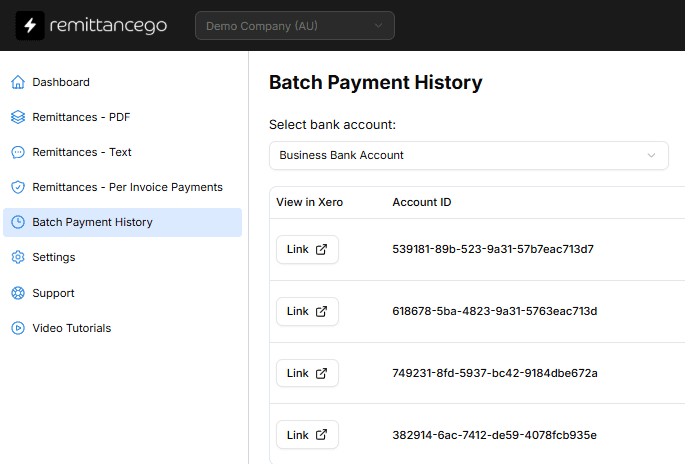
Yes. Once the batch payment is posted, Remittance Go gives you a direct link to view it in Xero. You can also see a history of all batch payments created through Remittance Go, which pulls from Xero's own batch payment records so the two are always in sync.
What errors does Remittance Go flag before posting a batch payment?
The most common issue Remittance Go catches is when the payment amount for an invoice exceeds the outstanding balance in Xero — for example, if a client has overpaid or the invoice has already been partially receipted. These lines are flagged on the review screen before anything is posted, so you can investigate or adjust the amount before the batch goes to Xero.
Can I process remittances across multiple Xero organisations?
Yes. Remittance Go supports multiple Xero connections. You can connect more than one organisation and route each remittance to the correct one during processing.
Start creating batch payments in Xero automatically
Start for free. No credit card required.