
Getting Listed on the Xero App Store — A Practical Developer Guide
A consolidated guide to getting your app certified and listed on the Xero App Store — covering the required checkpoints, OAuth connection patterns, error handling, scopes, deep linking, and what we learned building Remittance Go.

Remittance Go is now listed on the Xero App Store. Getting there involved working through Xero's certification process — nine required checkpoints, each with specific implementation and UX requirements before your app can go live.
Xero Certification Checklist — Download
The spreadsheet we used internally to track all 30 certification checkpoints, with status notes for each item. Download it and use it as your own tracking sheet.
Download .xlsx
Xero's team was wonderful to work with and their documentation is comprehensive. This is a consolidated companion — not a replacement — focused on the 9 required checkpoints and the best-practice items we found most impactful.
Of the 30 total checkpoints, only 9 are required for certification.
The 9 Required Certification Checkpoints
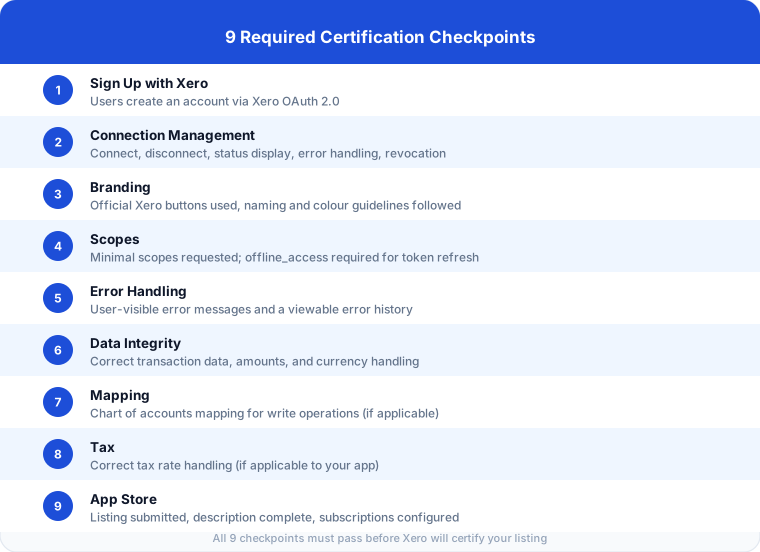
Xero's certification process evaluates your app against nine checkpoints. You'll need to pass all nine — plus have ten customers using your app — before Xero will certify it.
| # | Checkpoint | What Xero is checking |
|---|---|---|
| 1 | Sign Up with Xero | Users can create an account via Xero's OAuth flow |
| 2 | Connection | Connect, disconnect, status display, error handling |
| 3 | Branding | Xero buttons used, naming guidelines followed |
| 4 | Scopes | Minimal scopes requested, offline_access included |
| 5 | Error Handling | User-visible error messages, error log or history |
| 6 | Data Integrity | Correct transaction data, currency handling |
| 7 | Mapping | Account mapping for write operations (if applicable) |
| 8 | Tax | Correct tax rate handling (if applicable) |
| 9 | App Store | Listing submitted, subscriptions configured |
Below we cover the checkpoints that tend to involve the most implementation work, plus a few best-practice items that are worth implementing early.
1. Sign Up with Xero
Sign Up with Xero is for users arriving from the Xero App Store. Xero passes attribution data through the OAuth flow — this is how referrals count toward your 10-customer requirement. Use the official button; a generic OAuth button won't do.
The OAuth flow redirects the user to Xero, where they approve your requested scopes and connect their organisation. Xero then redirects back to your app with an authorisation code, which you exchange for an access token and refresh token.
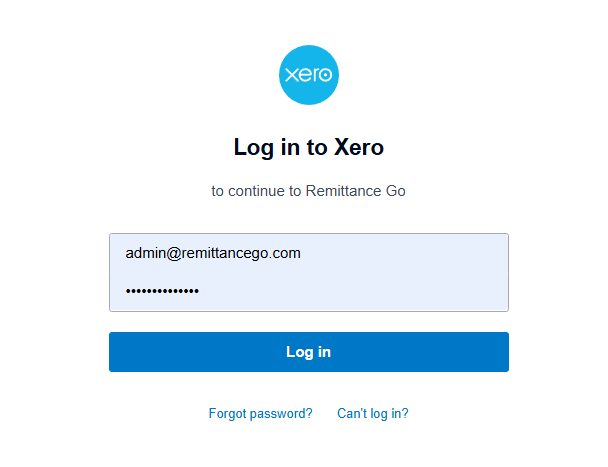
Store the refresh_token securely. It's what allows your app to continue working after the 30-minute access token expires without asking the user to reconnect.
2. Sign In with Xero
Sign In with Xero is for returning users who access your app directly — through your website, a saved bookmark, or a direct link. They already have an account; they just need to authenticate.
Both flows use identical OAuth mechanics. The difference is intent and attribution. When someone arrives from the Xero App Store, use "Sign Up with Xero." When someone opens your app directly, use "Sign In with Xero." Xero will check that both buttons are present and correctly labelled — using the wrong label on either is a common reason for certification delays.
Clicking either button redirects the user to Xero's hosted login page, where they enter their Xero credentials and approve your app's requested scopes:
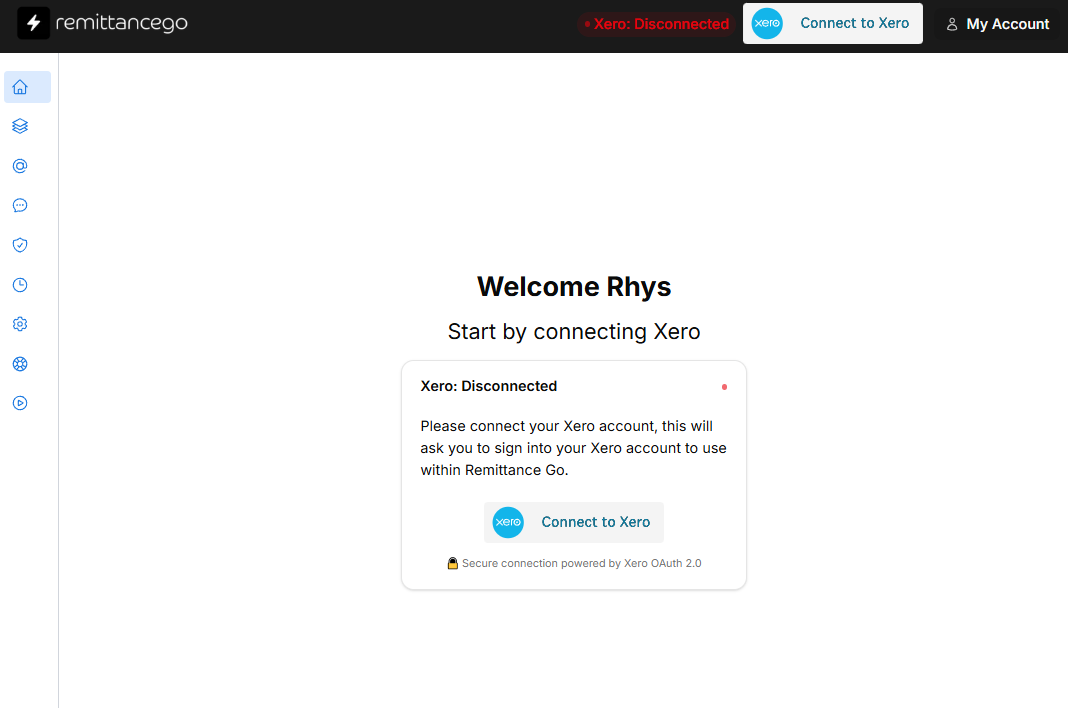
Xero provides official branded button assets for both flows. Use them — the certification team checks button design specifically.
3. Connection Management
Connection management is one of the most detailed checkpoints and the one that catches most teams out. Xero requires all of the following in your UI:
Connected
Organisation
AAcme Corp Pty Ltd
Acme Corp Pty Ltd
AU · Active
Blue Sky Accounting
AU · Active
Greenway Partners
NZ · Active
Sunrise Health Group
UK · Active
The Corner Bookshop
AU · Active
Harbour City Physio
AU · Active
Midlands Legal Group
UK · Active
Peak Construct NZ Ltd
NZ · Active
Westside Dental Practice
AU · Active
- Display the connected tenant name — not just "Connected". The user needs to see which Xero organisation is linked.
- Display connection status — clearly show whether the connection is active or broken.
- Disconnect button — let users disconnect from your settings page. When they click it, call
DELETEon the Xero connections endpoint to revoke the connection properly. - Alerts on API errors — if a Xero API call fails due to a connection issue, show the user an alert and prompt them to reconnect. Don't fail silently.
- Handle Xero-side disconnects — if a user revokes your app from within Xero, your app needs to detect this and update its connection status accordingly.
- Revoke expired or unused connections — maintain a process that cleans up connections that are no longer active. This matters particularly so you aren't charged for referrals who signed up but never converted.
The OAuth connection lifecycle looks like this:
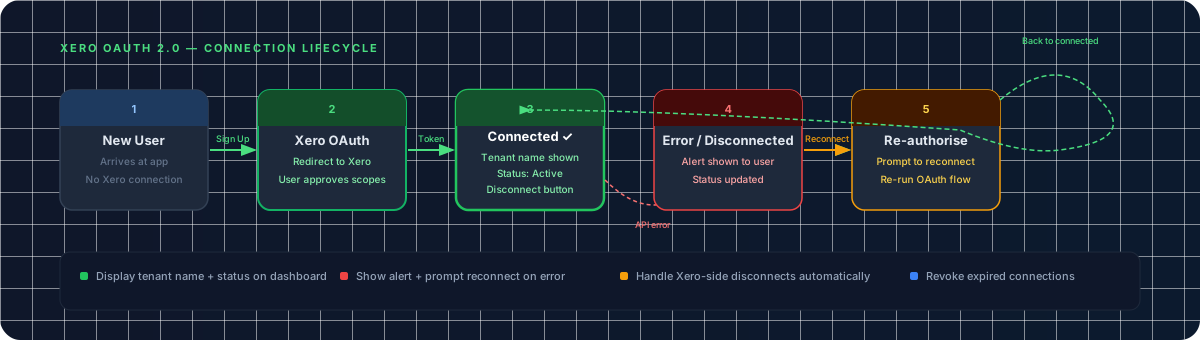
For multi-tenant scenarios (one user connecting multiple Xero organisations), disconnecting a single tenant requires calling DELETE on that specific connectionId rather than revoking the entire user's access.
5. Scopes
Request only the scopes your app genuinely needs. Xero's certification team will check that you're not requesting permissions you don't use — and users are increasingly cautious about apps that ask for broad access.
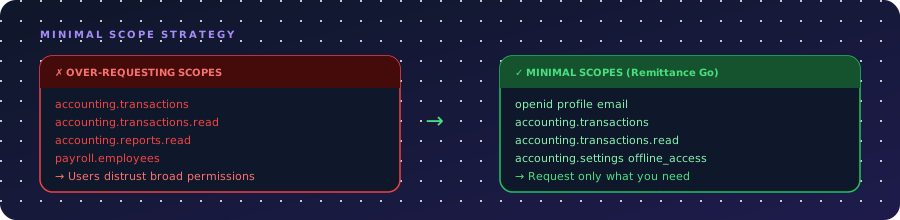
For Remittance Go, our scope string is:
openid profile email accounting.transactions.read accounting.transactions accounting.settings offline_access
offline_access is required. Without it, your tokens won't refresh and users will be forced to reconnect every 30 minutes.
Granular scopes: Apps created on or after 2 March 2026 must use granular scopes. If a requested scope isn't granted, the API returns a 401 with WWW-Authenticate: insufficient_scope — catch this specifically and prompt the user to "Update Permissions" rather than showing a generic error.
6. Error Handling
Xero's error handling requirements have two parts: user-visible messages, and an error log or history.
User-visible messages should be clear and actionable. Examples from our own app:
- Error Creating Batch Payment — with the option to retry or contact support
- Error: No Matches Found — explaining what the user can do next
- Disconnected from Xero — with a one-click reconnect prompt
Xero recommends surfacing the human-readable error messages that come back in their API responses where possible, rather than showing generic failures. Their validation errors are well-structured and often tell the user exactly what went wrong.
Error log: Users should be able to see a history of errors — not just the current state. This is particularly useful for teams where the person who set up the integration might not be the same person who processes transactions day-to-day.
14. Deep Linking to Xero Pages
An optional checkpoint, but high value and easy to implement. Deep linking lets users click from your app directly to the matching record in Xero — for example, opening a specific batch payment straight from your processing summary.
The Xero deep link format for common records:
# Invoice
https://go.xero.com/AccountsReceivable/View.aspx?InvoiceID={invoiceId}

# Contact
https://go.xero.com/Contacts/View/{contactId}

# Bank Account
https://go.xero.com/Bank/BankAccounts.aspx
For Invoice URL (a related feature), you can set a URL on an invoice that Xero will display as a button inside the invoice view — linking back to the relevant record in your app. We use this to link back to the remittance processing history page.
Best-Practice Items Worth Prioritising
Beyond the nine required checkpoints, a few things are worth building early:
Idempotency-Key header: Add to POST requests. Retrying with the same key after a network timeout prevents duplicate records.
If-Modified-Since header: Use when polling for updated records. Cuts API call volume significantly against the 60 req/min rate limit.
Paging: Use the page parameter on high-volume endpoints (invoices, contacts). 100 records per page is more reliable than bulk fetches.
Rate limits: 60 API calls/min per app per org. Most apps won't hit this. If you're processing large volumes, cache access tokens and add small delays between sequential batches.
A Note on AI and Xero Data
As of December 2025, Xero's updated developer terms explicitly prohibit using data accessed via the Xero API to train AI or machine learning models. This applies to all Xero apps regardless of registration date (for apps registered before December 2025, these terms took effect March 2026).
If your app uses AI in any capacity, make sure your data pipeline keeps Xero-sourced data clearly separate from any training inputs. This is a hard requirement, not a guideline.
Getting Your First 10 Customers
Certification requires 10 customers with active Xero connections — not 10 signups, 10 live connections. Plan for this before you submit.
- Recruit directly on LinkedIn. Reach out personally to businesses in your target market who use Xero. A direct message explaining what you're building converts surprisingly well — far better than waiting for organic signups.
- Watch them use the app. Early sessions reveal what's confusing, what's broken, and what to build next. One hour watching a real user is worth more than any analytics dashboard.
- Build a marketing pipeline. Track leads from first contact to active connection. Email us and we'll share ours.
- Make an amazing website. Your Xero App Store listing links to your site — it's often the first thing a potential customer sees after finding you. Make it count.
Xero Developer Resources
Xero's documentation is comprehensive. These are the pages we referenced most:
- Certification Checkpoints — the official requirements
- OAuth 2.0 Auth Flow — the full OAuth implementation guide
- Managing Connections — connection display and lifecycle requirements
- Scopes Reference — full scope list
- Deep Linking — deep link URL patterns
- Granular Scopes FAQ — what changed in March 2026
Talk to Us
We went through this process end-to-end with Remittance Go, and we're happy to share what we know. If you're building a Xero integration and want to compare notes — on the certification process, on specific implementation details, or just on what it's like working with Xero as a partner — reach out.
Questions for Remittance Go?
We're not Xero — but we've been through the process and are happy to discuss it. Send us a message and we'll get back to you.
Get in touch →
Frequently asked questions
How many customers do I need before Xero will certify my app?
Ten customers with active Xero connections through your app. These need to be real end-users, not test accounts or internal staff.
Do I need to implement all 30 checkpoints?
No. Nine are required for certification. The remaining 21 are best-practice recommendations — many are worth implementing, but you won't be blocked from listing without them.
What scopes does Xero require for basic read/write access?
There's no single required set — it depends on what your app does. Request the minimum scopes your app genuinely needs. Always include offline_access to enable token refresh.
Can I use Xero data to train an AI model?
No. Xero's developer terms (updated December 2025, effective March 2026 for existing apps) explicitly prohibit using Xero API data to train AI or machine learning models.
How long does the certification process take?
It depends on your readiness and how busy Xero's developer advocates are. It personally took us a solid 3 months.
What's the difference between Sign Up with Xero and Sign In with Xero?
Sign Up is for new users arriving from the Xero App Store — it carries attribution data that counts toward your 10-customer certification requirement.
Sign In is for returning users who already have an account, or for users who found you through a different channel initially (your website, LinkedIn, word of mouth) rather than the App Store.