
Overcoming Xero's 200 Batch Payment API Limit — A Developer's Guide
A practical TypeScript guide to working with the Xero Batch Payments API — covering the BatchPayload type, invoice deduplication, the 200-line limit, and a production-ready chunking implementation.
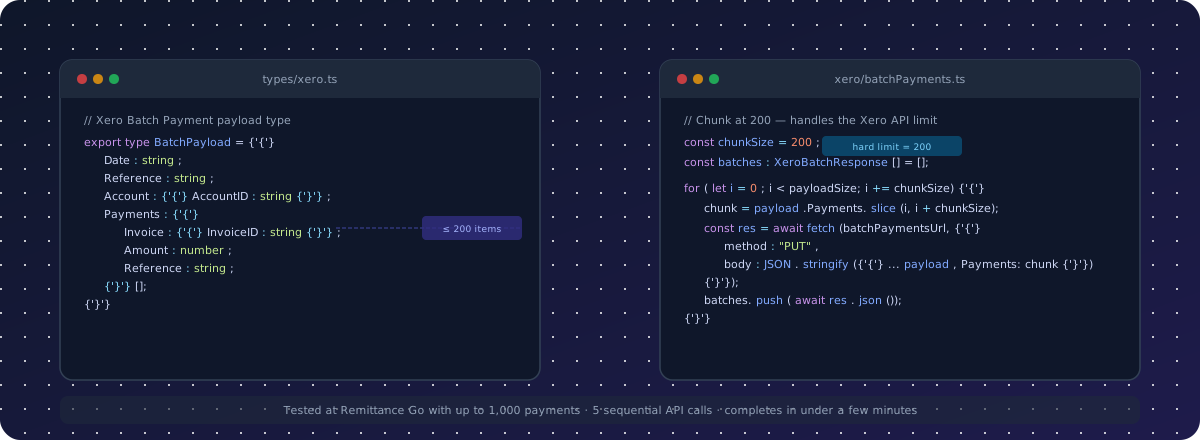
This guide walks through integrating with the Xero Batch Payments API in TypeScript — from defining your payload types to handling the 200-payment limit in a production environment.
If you're building a remittance processing tool, an accounts payable integration, or any automation that creates batch payments in Xero, this covers the constraints you'll encounter and the patterns that work reliably at scale.
Not a developer? See the non-technical overview: Xero's 200 Batch Payment Limit Explained →
The Batch Payment API Endpoint
The Xero Batch Payments API uses a PUT request to create batch payments:
PUT https://api.xero.com/api.xro/2.0/BatchPayments
Full reference: developer.xero.com/documentation/api/accounting/batchpayments
Required headers:
{
  "Authorization": "Bearer <access_token>",
  "Content-Type": "application/json",
  "Accept": "application/json",
  "xero-tenant-id": "<tenant_id>"
}
The tenant ID is retrieved from the Xero Connections endpoint and must match the organisation you're creating payments in.
Defining the Payload Type
A well-typed payload reduces integration errors significantly. Here is the core BatchPayload type that maps directly to what the Xero API expects:
export type BatchPayload = {
  Date: string;           // ISO 8601 date string, e.g. "2026-05-29"
  Reference: string;      // Payment run reference, e.g. "REM-2026-0512"
  Account: {
    AccountID: string;    // The Xero bank account UUID to pay from
  };
  Payments: {
    Invoice: {
      InvoiceID: string;  // Xero's internal UUID for the invoice
    };
    Amount: number;       // Amount being applied to this invoice
    Reference: string;    // Per-line reference (invoice number, etc.)
  }[];
};
A few things worth noting about the shape:
Dateis the payment date, not the creation date. It controls which accounting period the payment falls into.Account.AccountIDis the UUID of the bank account in Xero, not the contact or the invoice account code.- Each item in
Paymentsreferences a single invoice by its XeroInvoiceID— not the human-readable invoice number. You must look up theInvoiceIDfrom the invoices endpoint before constructing this payload. Amountis the amount being applied to that specific invoice, which may differ from the invoice's total (for partial payments or adjustments).
Here is what a complete payload looks like with five invoices:
const payload: BatchPayload = {
  Date: "2026-05-29",
  Reference: "REM-2026-0512",
  Account: {
    AccountID: "a8f3b2d1-4c7e-4f9a-b1e2-8d3c6a0f5e12",
  },
  Payments: [
    {
      Invoice: { InvoiceID: "c1d2e3f4-1a2b-3c4d-5e6f-7a8b9c0d1e2f" },
      Amount: 1200.00,
      Reference: "INV-1041",
    },
    {
      Invoice: { InvoiceID: "d4e5f6a7-2b3c-4d5e-6f7a-8b9c0d1e2f3a" },
      Amount: 850.50,
      Reference: "INV-1042",
    },
    {
      Invoice: { InvoiceID: "e7f8a9b0-3c4d-5e6f-7a8b-9c0d1e2f3a4b" },
      Amount: 3400.00,
      Reference: "INV-1043",
    },
    {
      Invoice: { InvoiceID: "f0a1b2c3-4d5e-6f7a-8b9c-0d1e2f3a4b5c" },
      Amount: 600.00,
      Reference: "INV-1044",
    },
    {
      Invoice: { InvoiceID: "a3b4c5d6-5e6f-7a8b-9c0d-1e2f3a4b5c6d" },
      Amount: 2750.75,
      Reference: "INV-1045",
    },
  ],
};
The Duplicate Invoice Constraint
Before you think about the 200-line limit, there's a constraint that trips up most integrations early: Xero will reject a batch payment that contains the same InvoiceID more than once.
This happens more often than you might expect. A remittance advice may list the same invoice twice — for example:
However you structure your payload-building logic, make sure duplicate invoice payments are merged programmatically before the payload is constructed — not as an afterthought. The source data (a remittance PDF, a CSV, an AP export) may contain the same invoice ID on multiple lines, and Xero will reject the entire batch if it does.
Making a Basic API Call
Here is the simplest possible implementation — a single batch payment with no limit handling:
const batchPaymentsUrl =
  "https://api.xero.com/api.xro/2.0/BatchPayments";

async function createSimpleBatchPayment(
  payload: BatchPayload
): Promise<XeroBatchResponse> {
  const token = await getXeroToken();
  const connection = await fetchXeroConnections();
  const tenantId = connection?.tenantId;

  const response = await fetch(batchPaymentsUrl, {
    method: "PUT",
    headers: {
      Authorization: `Bearer ${token}`,
      "Content-Type": "application/json",
      Accept: "application/json",
      "xero-tenant-id": `${tenantId}`,
    },
    body: JSON.stringify(payload),
  });

  if (!response.ok) {
    const errorText = await response.text();
    throw new Error(
      `Xero API error ${response.status}: ${errorText}`
    );
  }

  return response.json();
}
This works for batches under 200 payments. If payload.Payments.length > 200, Xero returns a 400 and you get an exception. The next section handles that.
The 200-Payment Limit
The Xero Batch Payments API enforces a hard limit of 200 payment lines per request. Attempting to send more returns:
Xero does not do partial processing. If you send 201 payments, zero are created. You must handle this in your application.
Chunked Batch Payment Implementation
The solution is to slice the payments array into chunks of 200 and submit each chunk as a separate sequential API call. Each chunk becomes its own batch payment record in Xero, with the same date, account, and reference.
export type XeroBatchResponse = {
  BatchPayments: {
    BatchPaymentID: string;
    Date: string;
    Reference: string;
    Type: string;
    Status: string;
    TotalAmount: number;
    IsReconciled: boolean;
    Payments: {
      PaymentID: string;
      Amount: number;
      Invoice: { InvoiceID: string; InvoiceNumber: string };
    }[];
  }[];
};

export async function createBatchPayment(
  payload: BatchPayload
): Promise<XeroBatchResponse[] | { error: string; status: number; details: string }> {
  const token = await getXeroToken();
  const connection = await fetchXeroConnections();
  const tenantId = connection?.tenantId;

  const payloadSize: number = payload.Payments.length;
  const chunkSize: number = 200;

  const listOfBatchesCreated: XeroBatchResponse[] = [];

  for (let i = 0; i < payloadSize; i += chunkSize) {
    const chunk = payload.Payments.slice(i, i + chunkSize);

    const batchPaymentResponse = await fetch(batchPaymentsUrl, {
      method: "PUT",
      headers: {
        Authorization: `Bearer ${token}`,
        "Content-Type": "application/json",
        Accept: "application/json",
        "xero-tenant-id": `${tenantId}`,
      },
      body: JSON.stringify({ ...payload, Payments: chunk }),
    });

    if (!batchPaymentResponse.ok) {
      const errorText = await batchPaymentResponse.text();
      return {
        error: `Batch payment failed (Xero status ${batchPaymentResponse.status}). Please check Xero directly to confirm whether the payment was created.`,
        status: batchPaymentResponse.status,
        details: errorText,
      };
    }

    const batchPayment = await batchPaymentResponse.json();
    listOfBatchesCreated.push(batchPayment);
  }

  return listOfBatchesCreated;
}
How it works
The loop iterates through the payments array in steps of 200:
i = 0→ chunk is payments[0..199]→ first batch payment createdi = 200→ chunk is payments[200..399]→ second batch payment createdi = 400→ chunk is payments[400..499]→ third batch payment created (last chunk, partial)
Each chunk is spread into a new payload object using { ...payload, Payments: chunk }, preserving the original Date, Reference, and Account fields across all batches.
If any chunk fails, the function returns early with an error object rather than throwing — allowing the caller to surface a meaningful message to the user and avoid leaving them unsure whether payments were partially created.
Putting It All Together
Here is the complete call sequence for production use:
async function processRemittancePayments(
  rawPayments: BatchPayload["Payments"],
  date: string,
  reference: string,
  accountId: string
): Promise<XeroBatchResponse[] | { error: string; status: number; details: string }> {
  // Step 1: Deduplicate invoice lines
  const deduped = deduplicatePayments(rawPayments);

  // Step 2: Build typed payload
  const payload: BatchPayload = {
    Date: date,
    Reference: reference,
    Account: { AccountID: accountId },
    Payments: deduped,
  };

  // Step 3: Submit in chunks (handles 200-line limit automatically)
  return createBatchPayment(payload);
}
The caller doesn't need to know about the 200-line limit or deduplication — those concerns are encapsulated inside the helpers.
Real-World Scale: Remittance Go's Experience
At Remittance Go, we process remittance advice PDFs and reconcile them into Xero automatically. We've tested this chunking implementation with batches of up to 1,000 payments — the equivalent of five sequential Xero API calls, each with 200 payment lines.
At that scale:
- Xero processes each chunk without issues
- The full sequence (token fetch, connection lookup, five API calls, response aggregation) typically completes in under a few minutes end-to-end
- We haven't encountered a hard ceiling above 1,000, but haven't needed to test higher volumes yet
The main constraint at high volumes is the Xero API rate limit (60 API calls per minute per app per organisation), not the batch size limit itself. At 1,000 payments across five batch calls, plus the token and connection calls, you're using around 7–8 API calls — well within the per-minute limit.
For integrations approaching the rate limit, consider:
- Caching your access token for its full 30-minute validity window
- Caching the tenant connection lookup (changes infrequently)
- Adding a small delay between chunks if you're processing many remittances concurrently