
Xero's 200 Batch Payment Limit: What It Means and How to Work Around It
Xero enforces a hard limit of 200 payments per batch. Learn what triggers it, why it exists, how it affects your reconciliation workflow, and how to work around it — manually and via the API.
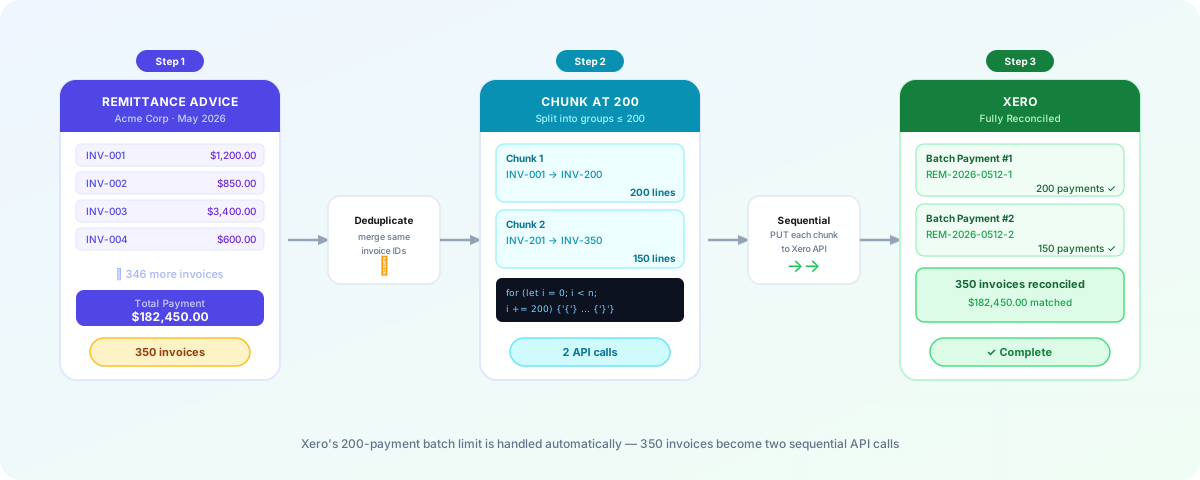
If you've ever tried to push a large payment through Xero and hit an unexpected wall, you've likely encountered Xero's 200-payment batch limit. It's one of the most commonly Googled Xero frustrations among bookkeepers, accounts receivable teams, and developers integrating with the Xero API — and for good reason.
This guide explains exactly what the limit is, why it exists, what happens when you hit it, and how to handle it — whether you're working inside Xero's UI or building against the Xero API.
What Is Xero's 200 Batch Payment Limit?
Xero enforces a hard limit of 200 individual invoice lines per batch payment. This applies both when creating batch payments manually through the Xero interface and when creating them programmatically via the Xero Accounting API.
A batch payment in Xero is a single payment record that groups multiple invoices together — paid from one bank account, on one date, with one reference. This is the standard mechanism for reconciling remittance advice that covers more than one invoice.
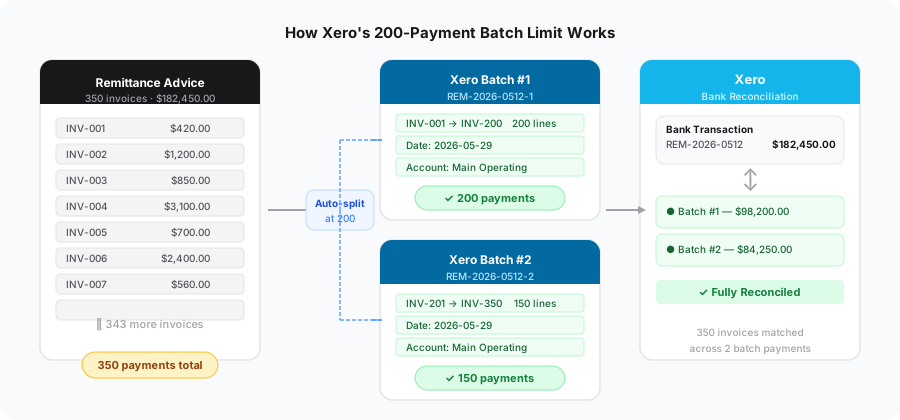
The limit of 200 means: if a single remittance advice covers 350 invoices, you cannot create one batch payment for all 350. Xero will reject it.
Why Does the Limit Exist?
Xero has not published an official technical rationale for the 200-line cap. Based on the API documentation and community discussions, it appears to be a combination of:
- API request size limits — large payloads increase response times and put strain on Xero's infrastructure
- UI performance — the Xero interface becomes unwieldy when displaying very large batch payment records
- Data integrity — smaller, bounded batches are easier to validate, audit, and roll back if something goes wrong
In practice, 200 invoices per batch is more than enough for the majority of payment runs. The limit most commonly affects:
- Large businesses running high-volume end-of-month payment runs
- NDIS registered businesses processing bulk claim payments across lots of services and participants
- Accounts receivable teams reconciling large enterprise customers who batch hundreds of invoices into a single remittance
- Developers and integrators building automated reconciliation tools on top of the Xero API
Xero Has No Remittance Import — Everything Is Manual
Xero has no way to import a remittance advice. There is no CSV upload, no PDF reader, no bulk-import tool for batch payments in the Xero interface. When a supplier sends you a remittance covering 350 invoices, Xero expects you to manually locate and select each one inside the batch payment screen.
If you select more than 200 invoices, Xero displays a validation error and refuses to post the batch:
"Batch payments can contain a maximum of 200 payments."
Nothing is saved. The entire batch is rejected, and you have to start again.
The manual workaround looks like this in practice:
- Receive the remittance advice (usually a PDF or email)
- Open Xero and manually search for each invoice by number
- Select up to 200, post that batch, then repeat for the next group
- Keep a careful record of which invoices were included in which batch to avoid double-posting
For a remittance covering 350 invoices, this means at minimum two separate sessions of manual data entry — with no safety net if you lose track of where you're up to.
This is why most businesses processing large remittances eventually look for a third-party solution — Xero simply doesn't provide the tooling to handle this workflow without significant manual effort.
What Happens When You Hit the Limit via the API?
When integrating with the Xero Batch Payments API, attempting to send more than 200 payment lines in a single API call will return an HTTP 400 error response with a validation error in the response body.
Error Log
Batch payment failed (Xero status 400). Please check Xero directly to confirm whether the payment was created.
Error Number: 10
Type: ValidationException
Message: A validation exception occurred
Validation Errors
• Batch payments cannot be created for more than 200 payments
Critically: Xero will not partially process the batch. The entire request is rejected. No payments are recorded in Xero, and you must handle the error in your application before retrying.
This is an important distinction from some other APIs that process what they can and return partial results. With Xero's Batch Payments API, it's all-or-nothing per request. 199 payments will work, 201 will not.
Developer note: If you need to handle this limit in your app and would like to read a developer article. See our developer guide on overcoming the Xero batch payment limit for a complete TypeScript implementation.
The Duplicate Invoice Problem
Before you even think about the 200-line limit, there's a related constraint that trips up many developers and power users: Xero does not allow duplicate invoice IDs within a single batch payment.
If your remittance/payment includes INV-123 paid in two separate line items (for example, two partial payments of $50 and $75), Xero will reject the batch. You must merge those lines into a single payment of $125 before sending.
This is most common when:
- A remittance advice splits a single invoice across multiple payment lines
- A credit note and a payment against the same invoice are included in the same batch
The fix is to aggregate all payments by invoice ID before constructing your batch, otherwise, the batch payment will be rejected.
Practical Impact by Business Type
Bookkeepers and accounting practices
For most small-to-medium clients, 200 invoices per batch is above what a single payment covers.
Where it becomes relevant is end-of-month large clients or clients in industries with high transaction volumes — healthcare (particularly NDIS), construction, and retail supply chains. If you manage any of these, it's worth having a documented process for splitting batches before you're under deadline pressure.
Large businesses and enterprise accounts receivable
High-volume AR teams receiving remittance advice from large enterprise customers will encounter this regularly. A single remittance from a major retailer or government body can easily list 400–800 individual invoices. Without automation, this means manually splitting every large remittance.
NDIS registered providers
NDIS plan managers are particularly exposed to this limit. Bulk NDIS claim payments from the NDIA can cover hundreds of participant invoices in a single remittance. If your process involves reconciling NDIS remittances into Xero, you need a reliable splitting strategy built into your workflow.
Developers and integrators
If you're building on the Xero API, the limit requires explicit handling in your application. See the developer guide for implementation details.
How to Work Around the 200-Payment Limit
Option 1: Manual splitting (no tooling)
The fallback for anyone without automation. Export your invoice list, split it into groups of ≤200 in Excel or Google Sheets, and create each batch payment in Xero separately.
Pros: No tooling required, works for one-off large batches
Cons: Time-consuming, error-prone, doesn't scale, requires consistent naming conventions to keep audit trail clean
Option 2: Build chunking logic into your API integration
If you're integrating programmatically, the cleanest solution is to split the payload in your application layer — before the API call — and send multiple sequential requests to Xero, each within the 200-line limit.
This is exactly what Remittance Go does. Our implementation has been tested with batches of up to 1,000 payments, which Xero processes as five sequential batches of 200. The full process — including Xero API calls and reconciliation confirmation — typically completes in under a few minutes.
Option 3: Use Remittance Go
Remittance Go handles the 200-line limit automatically. When you process a remittance advice that covers more than 200 invoices, Remittance Go splits the batch, sends them to Xero, and presents you with a perfect result — without you needing to think about the underlying limit at all.
This is particularly valuable for NDIS plan managers and large AR teams where oversized batches are routine rather than exceptional.
See how batch payments work in Remittance Go →
Frequently Asked Questions
Can I increase the 200-payment limit in Xero?
No. The 200-line limit is enforced by Xero and cannot be changed through account settings or by contacting Xero support. The only way to process more than 200 payments is to split them across multiple batch payment records.
Does the limit apply to the number of invoices or the number of payments?
The limit applies to the number of payment lines in the batch — which corresponds to individual invoices. For example, if INV-123 is listed 5 times because it has 5 seperate payments, this is 1 payment line. So, for example, a 543 invoice remittance may only be 160 unique invoices.
What error does Xero return if you exceed 200 payments via the API?
Xero returns an HTTP 400 Bad Request with a validation error indicating the batch exceeds the maximum size. The entire request is rejected — no partial processing occurs.
Does Xero count voided or draft invoices against the limit?
Only invoices in Authorised status can be included in a batch payment. Draft and voided invoices cannot be included, so they do not count toward the limit.
How does Remittance Go handle batches over 200 invoices?
Remittance Go automatically splits oversized batches into chunks of 200 or fewer before sending them to Xero. Each chunk is submitted as a separate batch payment with a consistent reference, and the results are aggregated before being returned to you. We've tested this with batches of up to 1,000 payments. Learn more about batch payment processing →
Are there other limits I should know about in the Xero API?
Yes. Beyond the 200-payment batch limit, the Xero API also enforces rate limits (60 calls per minute per app per organisation on the standard plan, with daily limits also applying). For high-volume integrations, you'll need to handle rate limiting with exponential backoff or queued processing. See Xero's API rate limit documentation for current figures.
Does splitting a batch affect reconciliation in Xero?
Each batch payment is a separate record in Xero, but they can all reference the same bank transaction date and a consistent reference prefix. When reconciling in the Xero bank feed, you'll need to match multiple batch payments to the single bank statement line — Xero's bank reconciliation supports splitting a bank transaction across multiple records.
Processing Large Remittances in Seconds
Remittance Go handles Xero's 200-payment limit in the background — no manual splitting, no naming conventions to manage, no risk of missing invoices across batch boundaries.
Upload your remittance advice (any PDF or CSV) and Remittance Go extracts the invoice data, identifies errors, and creates the payments in Xero — all in a matter of seconds.
Start free trial →