
What Is Remittance Advice? The Complete Guide for Australian Businesses
A plain-English guide to remittance advice — what it is, what it contains, the different types, real-world examples, and what to do when you don't receive one.
What is Remittance Advice?
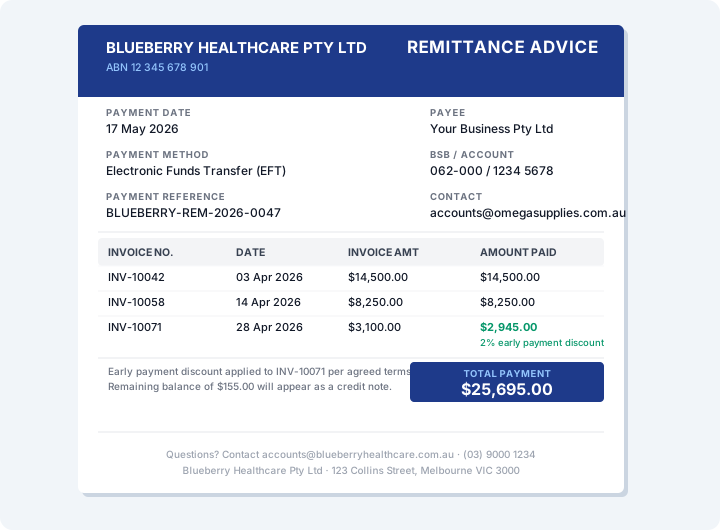
Remittance advice is a document sent by a payer to a payee at the time of making a payment, explaining exactly which invoices the payment covers and how much has been applied to each one.
Think of it as the "payment explanation" that travels alongside a bank transfer. Without it, if a customer sends you a single $25,000 EFT covering four different invoices, your accounts receivable team has to guess — or chase the customer — to find out what the money is for. Remittance advice eliminates that guesswork entirely.
A Real-World Example
Imagine you run a healthcare business. Your customer, Blueberry Healthcare, sends you a single EFT payment of $25,695.00 on 17 May.
Without remittance advice, you log into your Xero bank feed and see a $25,695.00 deposit with the reference "BLUEBERRY-REM-2026-0047." You now need to figure out which of your 14 outstanding invoices this covers. That's time spent cross-referencing spreadsheets, opening PDFs, and possibly calling Blueberry Healthcare's accounts team.
With remittance advice, Blueberry Healthcare's accounts team emails you a PDF at the same time as the payment. It lists:
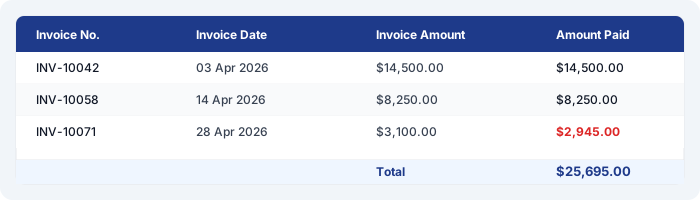
You can see immediately that INV-10071 was underpaid by $155.00. You either accept the adjusted amount or follow up with Blueberry Healthcare to clarify. Either way, reconciliation takes two minutes instead of twenty.
This is what remittance advice does. It turns a mysterious bank deposit into a clean, actionable record.
What Does Remittance Advice Contain?
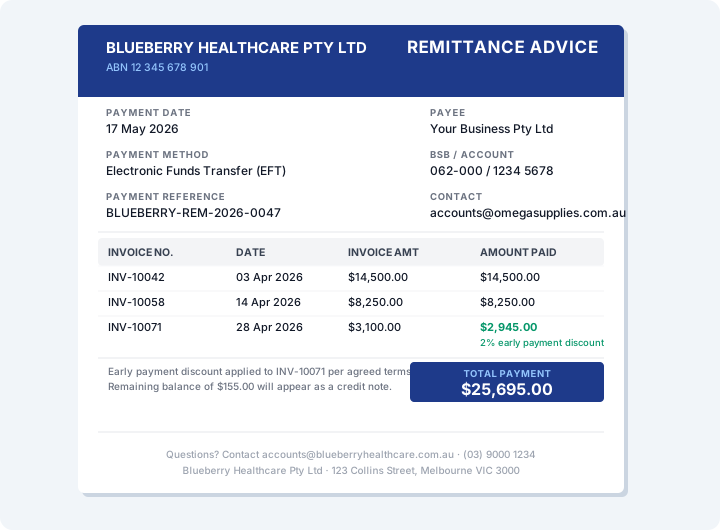
A complete remittance advice document typically includes the following fields:
- Payer details — The name, ABN, and contact information of the business making the payment.
- Payee details — The name of the business or individual receiving the payment, along with their bank account or BPAY details where relevant.
- Payment date — The date the payment was initiated — not necessarily the date funds arrive in your account, which may be a business day later for EFT.
- Payment method — EFT, BPAY, cheque, or direct debit. This is useful for reconciliation since different payment methods appear differently in your bank feed.
- Payment reference number — A unique identifier for the remittance, typically generated by the payer's accounts payable system. Useful for tracking and for resolving disputes.
- Invoice numbers — The full invoice number for each invoice being paid, exactly as it appears on the original invoice. This is the most critical field — a typo here can cause significant reconciliation headaches.
- Invoice amounts — The original amount of each invoice, before any discounts or adjustments.
- Amount paid per invoice — What was actually paid against each invoice. Where this differs from the invoice amount, it signals a discount, credit note, or short payment.
- Adjustments — Early payment discounts, credit notes applied, disputed amounts, or deductions. A well-formatted remittance advice will note the reason for any adjustment.
- Total payment amount — The sum of all amounts paid — this should match exactly the figure that appears in your bank statement.
Types of Remittance Advice
Email PDF remittance advice
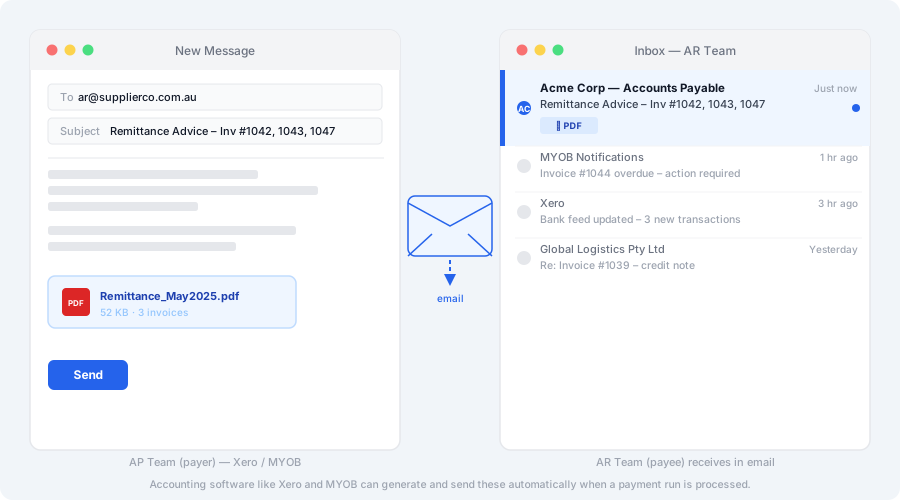
The most common format in Australia. The payer makes a bank transfer, then emails a PDF document to the payee's accounts receivable team listing all invoices covered by the payment. Most accounting software — including Xero and MYOB — can generate and send these automatically when a payment is recorded.
Portal or system-generated remittance
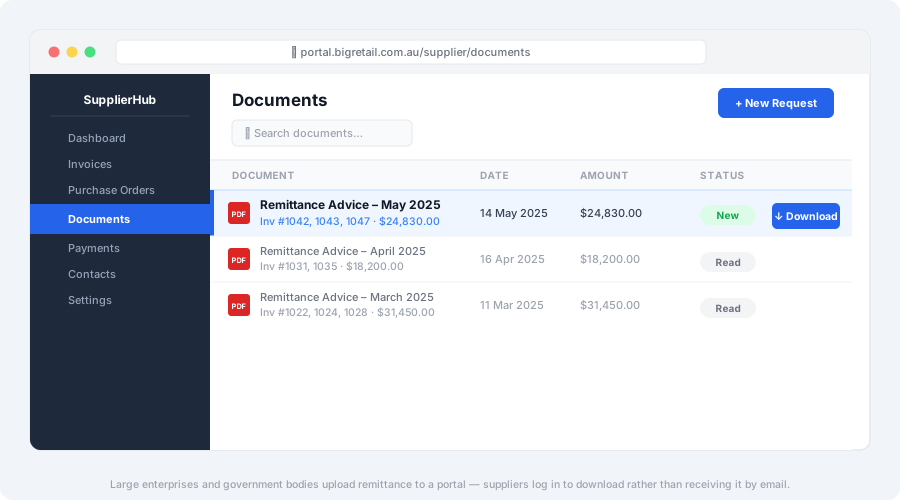
Many large enterprises and government bodies use supplier portals where remittance advice is automatically generated and uploaded for the supplier to download. Rather than arriving by email, the supplier logs into a web portal to retrieve payment information. This is common in healthcare (NDIS, Medicare), construction, and large retail supply chains.
EDI (Electronic Data Interchange) remittance
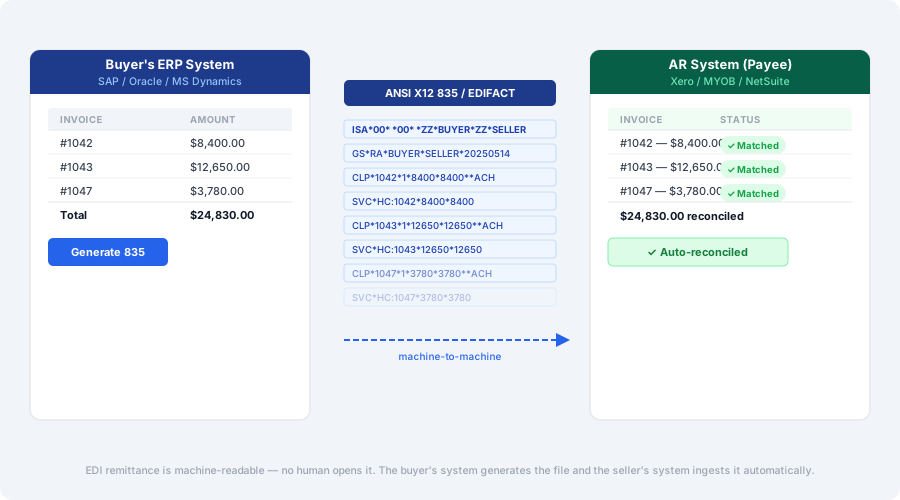
Used by large enterprises that exchange structured data files directly between accounting systems. Rather than a human-readable PDF, EDI remittance arrives as a machine-readable file (typically in ANSI X12 835 or EDIFACT format) that your accounting system can ingest automatically. Common in aviation, large-scale retail, and government contracting.
Text or SMS remittance
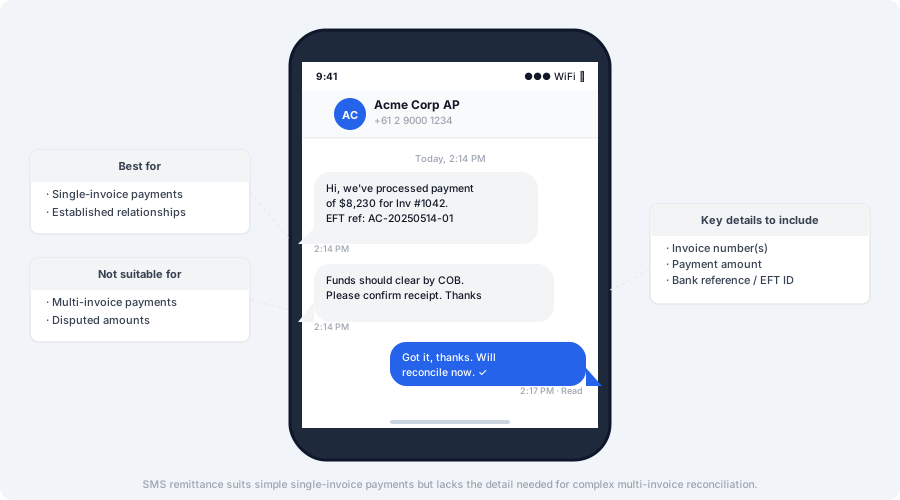
A small but growing format. The payer sends a brief SMS or messaging notification referencing the payment. Typically used for simple, single-invoice payments between businesses with an established relationship. Lacks the detail needed for complex multi-invoice reconciliation.
Printed or faxed remittance slips
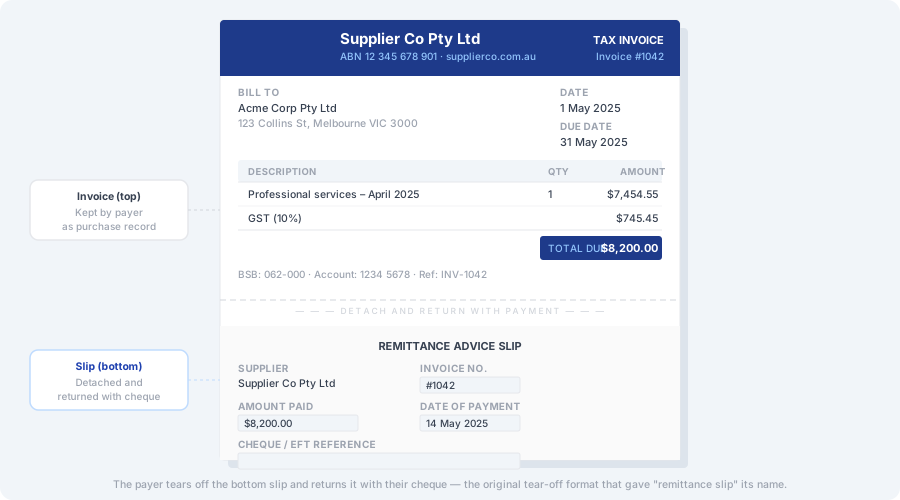
Still exist in some industries — particularly older supply relationships and some regional businesses — but increasingly rare. A printed remittance slip was historically the tear-off section of a paper invoice that the payer returned with their cheque.
How Remittance Advice Fits Into the Payment Cycle
Remittance advice sits between the payment and the reconciliation. It is not a legal document and it is not proof that funds have arrived — it is a communication that explains intent and provides the detail needed for the payee to do their job efficiently.
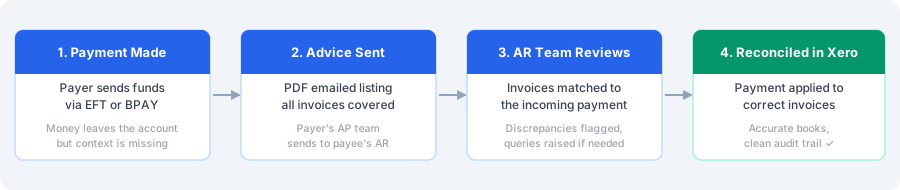
The payment cycle typically flows like this:
- Payer initiates payment — EFT, BPAY, or cheque is processed through their bank
- Payer sends remittance advice — a PDF is emailed to the payee's AR team at the same time or shortly after the payment is processed
- AR team receives and reviews — the team opens the PDF, checks invoice numbers, flags any discrepancies, and prepares to reconcile
- Reconciliation in Xero — the incoming bank transaction is matched to the correct invoices, closing them off cleanly
The bank payment and the remittance advice travel through different channels — the payment goes bank-to-bank, the remittance advice goes person-to-person (usually by email). This is why timing can sometimes be off: funds arrive before the email does, or vice versa.
Remittance Advice vs Invoice vs Receipt: What Is the Difference?
These three documents are all part of the same transaction but serve completely different purposes and travel in different directions.
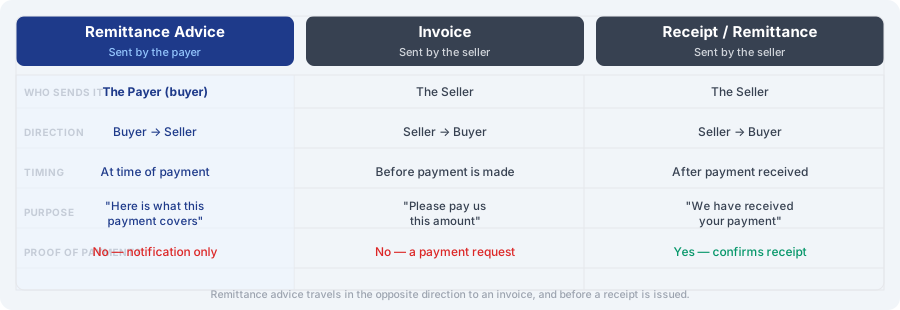
Here is a plain-English breakdown:
Invoice — sent by the seller to the buyer before payment, requesting payment for goods or services. An invoice says: "You owe us this amount."
Remittance advice — sent by the buyer to the seller at the time of payment, explaining what the payment covers. A remittance advice says: "We have paid you this amount, and here is what it covers."
Receipt — sent by the seller to the buyer after payment has been received and confirmed. A receipt says: "We have received your payment."
The key distinction most people miss: a remittance advice is not proof of payment. It is a notification of intended payment. Only a bank statement showing the debit, or a SWIFT confirmation for international transfers, constitutes proper proof that funds have moved.
Why Remittance Advice Matters for Your Business
| For the business receiving payment | For the business making payment |
|---|---|
| Faster reconciliation. When a payment arrives in your bank account, matching it to the correct invoices is straightforward if you have a remittance advice. Without one, you may spend significant time hunting through outstanding invoices to work out what the payment covers — particularly where a single payment covers multiple invoices. | Better supplier relationships. Suppliers whose AR teams can reconcile quickly are easier to deal with — they raise fewer queries, process credit applications faster, and are less likely to put your account on hold over an unresolved payment. |
| Early identification of discrepancies. If a customer has applied an early payment discount, deducted a credit note, or short-paid an invoice, the remittance advice will show this before you reconcile. You can decide whether to accept the adjusted payment or follow up with the customer, rather than discovering the discrepancy weeks later during a month-end review. | Internal controls. Generating and sending remittance advice creates an internal record of what was paid and when. This makes it easier to manage AP reconciliation and harder for duplicate payments to slip through undetected. |
| Cleaner audit trail. Keeping remittance advice records alongside your invoice and bank records gives you a complete, three-way picture of each transaction: what was invoiced, what was paid, and what arrived in your account. | Confirmation of payment terms applied. If you have negotiated an early payment discount or a credit note arrangement, recording it on the remittance advice protects you — it creates a paper trail if the supplier later disputes the adjusted amount. |
| Faster dispute resolution. If a customer later disputes whether an invoice was paid, the remittance advice is the first document you reach for. It shows exactly what the customer claimed to pay and when. | |
| Reduced debtor chasing. When customers send remittance advice consistently, your AR team spends less time following up on payments that have already been made but haven't yet been matched in your system. |
When Should You Send Remittance Advice?
Best practice is to send remittance advice at the same time as — or immediately after — making a payment. You should always send it when:
- You are paying multiple invoices in a single payment — without remittance advice, the payee cannot match the lump sum to individual invoices
- You are making a partial payment against a larger invoice
- You have applied an early payment discount or offset a credit note
- The bank transfer reference does not clearly identify the invoice being paid
- You are paying a supplier for the first time
- You are paying international invoices where currency conversion may cause the received amount to differ from the invoice amount
What to Do When You Don't Receive Remittance Advice
This is the scenario most guides ignore. Your bank feed shows a deposit — but no remittance advice has arrived. Here is how to handle it efficiently.
Step 1: Check your spam and junk folder. Remittance advice emails are frequently flagged as spam, particularly if they are automated from an accounting system you haven't previously received email from.
Step 2: Check for a supplier portal. Large enterprise customers and government bodies often do not send remittance by email — they upload it to a portal (Ariba, Coupa, SAP, government procurement portals) where you need to log in to retrieve it. Check whether the customer has sent you a portal access invitation in the past.
Step 3: Match by elimination. Log into your Xero bank feed and look at the payment amount. Run a search across your outstanding invoices for amounts that add up to the deposit total. If a single invoice matches exactly, it is safe to apply the payment — but still worth confirming with the customer.
Step 4: Contact the customer's accounts payable team. Email or call their AP team directly, referencing the date and amount of the deposit and asking them to send remittance. Keep it factual and brief — AP teams receive these requests regularly and will normally respond quickly.
Step 5: Reconcile and flag. If you cannot get a response quickly and the payment is clear, reconcile it against the most likely invoice(s) and add a note in Xero. Follow up separately to confirm the allocation. Do not leave bank transactions unreconciled waiting for a remittance that may never arrive.
Tip: If a particular customer regularly pays without remittance advice, the most effective fix is to build it into your payment terms or supplier onboarding process — see the section below on how to request it.
Best Practices for Sending Remittance Advice
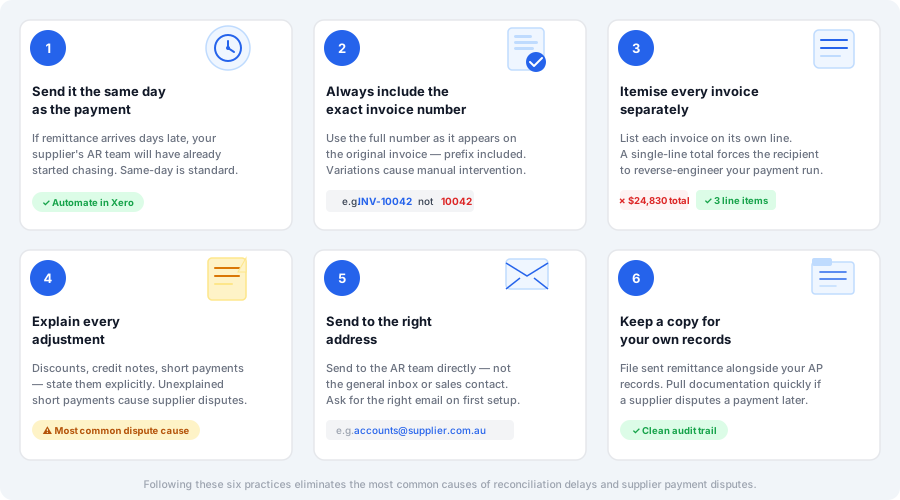
1. Send it the same day as the payment
Timing matters. If remittance advice arrives three days after the bank deposit, your supplier's AR team will have already started chasing. Same-day is the standard, and most accounting software can automate this entirely.
2. Always include the exact invoice number
Use the full invoice number exactly as it appears on the original invoice — including any prefix (INV-, SI-, etc.). Do not truncate, modify, or append your own reference. A supplier's accounting system searches for exact matches; variations cause manual intervention.
3. Itemise every invoice separately
Even if you are paying a large batch, list each invoice on its own line. A single-line total with no breakdown forces the recipient to reverse-engineer your payment run.
4. Explain every adjustment
If you have applied a discount, deducted a credit note, or short-paid an invoice for any reason, say so explicitly on the remittance. An unexplained short payment is one of the most common sources of supplier disputes.
5. Send to the right address
Your remittance advice should go to your supplier's accounts receivable team, not their general inbox or sales contact. Ask for the correct email when you first set up the account.
6. Keep a copy for your own records
File sent remittance advice alongside your AP records. This creates a clear audit trail and lets you pull documentation quickly if a supplier disputes a payment months later.
The Problem with Manual Remittance Processing
For businesses on the receiving end of remittance advice, the manual processing workflow looks something like this:
- Open email and download the PDF attachment
- Read through the invoice list
- Open Xero's bank reconciliation screen
- Find the matching bank transaction (which may have arrived days earlier)
- Manually look up each invoice number in Xero
- Apply the payment line by line
- Check for discrepancies and note any adjustments
- File the PDF
- Repeat for the next remittance
For a business receiving five or ten remittances a week, this is a manageable if tedious process. For bookkeepers managing multiple clients, or AR teams handling dozens of remittances daily, it becomes a significant time sink — and a source of errors. A misread invoice number, a transposed digit, or a missed credit note can cause reconciliation problems that take far longer to unwind than the original processing would have taken.
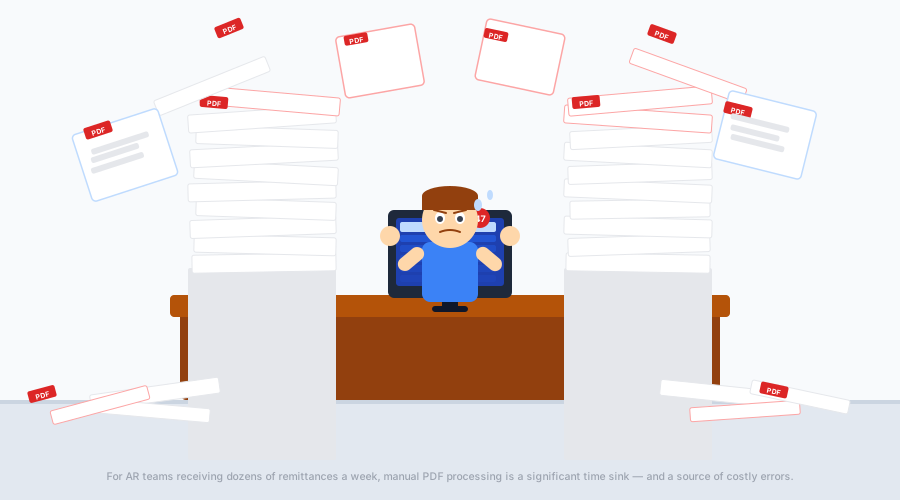
The core issue is that remittance advice arrives in an unstructured format — a PDF that a human has to read and re-enter. Every supplier formats their remittance differently. Invoice numbers appear in different columns, payment references use different formats, and adjustments are described in free-text notes that don't map cleanly to accounting system fields.
How RemittanceGo Automates Remittance Processing
Remittance Go solves the manual processing problem by reading incoming remittance advice PDFs automatically and reconciling payments in Xero — without any manual data entry.
Here is how it works:
- Forward or upload your remittance PDFs — RemittanceGo accepts PDFs in any format, from any supplier
- AI reads and extracts the data — invoice numbers, amounts, adjustments, and payment references are extracted automatically
- Invoices are matched in Xero — RemittanceGo finds the matching open invoices in your Xero account
- You review and approve — a summary shows you what will be reconciled, with any discrepancies flagged for your attention
- Batch payment created — once approved, the batch payment is created in Xero and the invoices are closed off
The result: a process that takes 15–20 minutes per remittance manually takes under a minute with RemittanceGo — and the error rate drops to near zero because there is no manual re-entry of invoice numbers or amounts.
See how PDF remittance processing works →
Frequently Asked Questions
Is remittance advice required by law in Australia?
No. There is no legal requirement in Australia to issue or provide remittance advice. However, it is considered good business practice and is widely expected in B2B trade relationships. Some supply contracts specify that remittance advice must be provided, so it is worth checking your agreements with key customers.
What is the difference between remittance advice and a remittance slip?
The terms are often used interchangeably. A remittance slip traditionally referred to the tear-off portion of a paper invoice that the payer would return with their cheque payment — effectively a pre-formatted remittance advice. Today, both terms describe the document a payer sends to notify a payee of a payment.
What if I don't receive remittance advice from a customer?
Check spam first, then look for a supplier portal. If neither applies, contact the customer's AP team directly and ask them to send it. If you can't get a response quickly, reconcile the payment against the most likely invoices in Xero and add a note. See the full workflow in the section above: What to Do When You Don't Receive Remittance Advice.
How should I store remittance advice documents?
Remittance advice should be stored alongside your invoice and payment records for the relevant financial year. In Xero, you can attach the PDF directly to the reconciled bank transaction. For longer-term archiving, a consistent folder structure in cloud storage (Google Drive, SharePoint, OneDrive) organised by customer and date works well. The ATO generally expects business records to be kept for at least five years.
Can a remittance advice be used as proof of payment?
No — not reliably. A remittance advice is a notification of intended payment, not a confirmation that funds have arrived. A bank statement showing the debit, or a SWIFT confirmation for international transfers, is the appropriate document for proof of payment.
What is the difference between remittance advice and a tax invoice?
A tax invoice is issued by the seller and includes GST details — it is a legal requirement under Australian GST law for transactions over $82.50. A remittance advice is issued by the buyer and relates to payment, not the sale. They serve completely different purposes in the transaction lifecycle and are not interchangeable.
Do I need to issue remittance advice when I pay my own suppliers?
It is a courtesy rather than a legal obligation, but it is good practice — especially for multi-invoice payments. When you pay a supplier invoice in Xero, Xero can automatically generate and email a remittance advice to your supplier. See How to Send Remittance Advice in Xero for step-by-step instructions.
What is an 835 remittance advice?
An 835 is an electronic remittance advice (ERA) format used in the US healthcare system under HIPAA. It is a structured data file that health insurers send to healthcare providers to explain how a claim has been processed and paid. It is not used in Australia — Australian healthcare remittance (including Medicare and private health funds) uses different formats specific to the Australian claims processing system.
How do I automate remittance advice processing?
If you receive remittance advice as PDF attachments in email, the most efficient approach is to use a tool like RemittanceGo that reads the PDFs automatically, matches invoices in Xero, and creates the batch payment — removing the need for manual data entry entirely.
Ready to Stop Processing Remittances Manually?
RemittanceGo reads your incoming remittance advice PDFs — in any format, from any supplier — and reconciles the payments in Xero automatically. No copy-pasting. No manual invoice lookups. No errors from misread invoice numbers.