
NDIS Remittance Processing in Xero: A Complete Guide
A practical guide to reconciling NDIS remittance advice in Xero — covering the reference number problem, CSV bulk files, manual workflows, and how to automate the whole process.

What Is NDIS Remittance Processing?
NDIS remittance advice arrives in formats ranging from a 160-page PDF to a 500-row CSV, with invoice references that look nothing like the numbers in your accounting system. Every payment needs to be matched, reviewed, and posted to Xero before you can close off the week.
This guide covers what an NDIS remittance looks like, why it's hard to reconcile in Xero, and how to make the process faster.
What an NDIS Remittance Advice Actually Looks Like
When the NDIA processes your claims and releases payment, they send a remittance advice to the provider. This document lists every payment request that was included in the batch — broken down by support item code, participant, and claim reference.
A typical NDIS remittance looks like this:
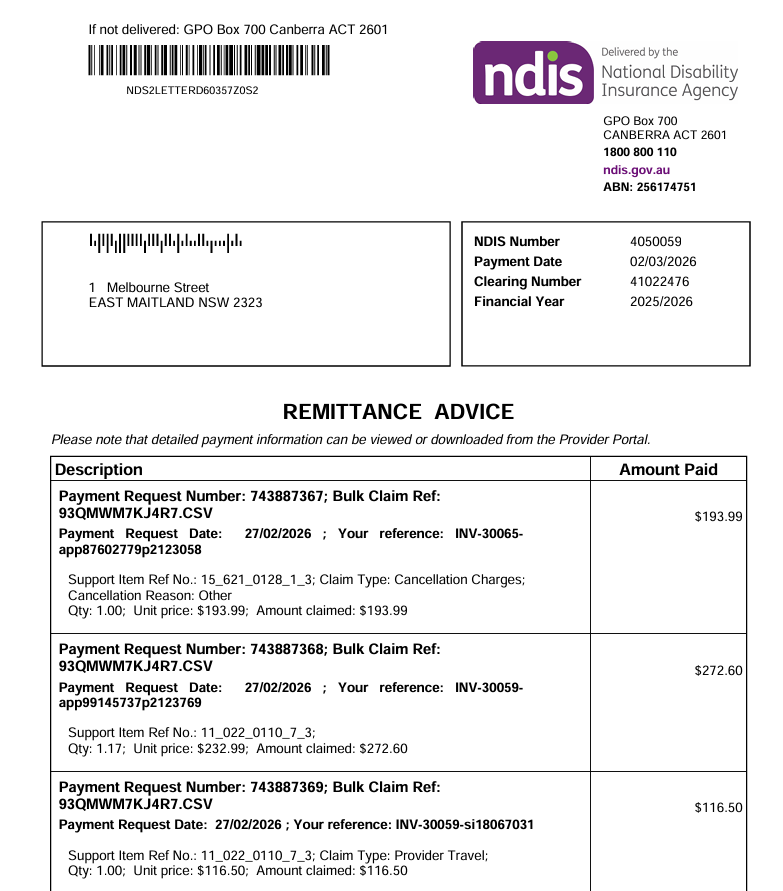
Each row in the remittance represents a single invoice. A remittance covering 20 participants across a fortnight of services might have 300 rows. An allied health provider can easily have remittances covering 100-500 invoices, though typically, most are smaller at 20-100 or so.
The document itself contains:
- NDIS Number — your provider registration number
- Payment Date — when the NDIA released funds (not when it arrives in your account)
- Clearing Number — the batch reference used by the NDIA's payment system
- Payment Request Numbers — one per claim line, generated by the NDIA
- Bulk Claim Reference — ties all requests back to a single CSV submission
- Support Item Reference Numbers — encoded strings like
11_022_0110_7_3representing the specific support category and registration group - Your Reference — this is where things get complicated
The Manual Workflow in Xero
NDIS payments are processed within 2 to 3 days of when the invoices are submitted to the NDIA. Most providers will do a daily submission of invoices for the day prior (the faster you invoice - the faster you get paid).
That means NDIS payments can arrive daily. Some providers submit weekly rather than daily — but the less frequently you submit, the longer you wait to get paid. Submitting more often is better for cash flow.
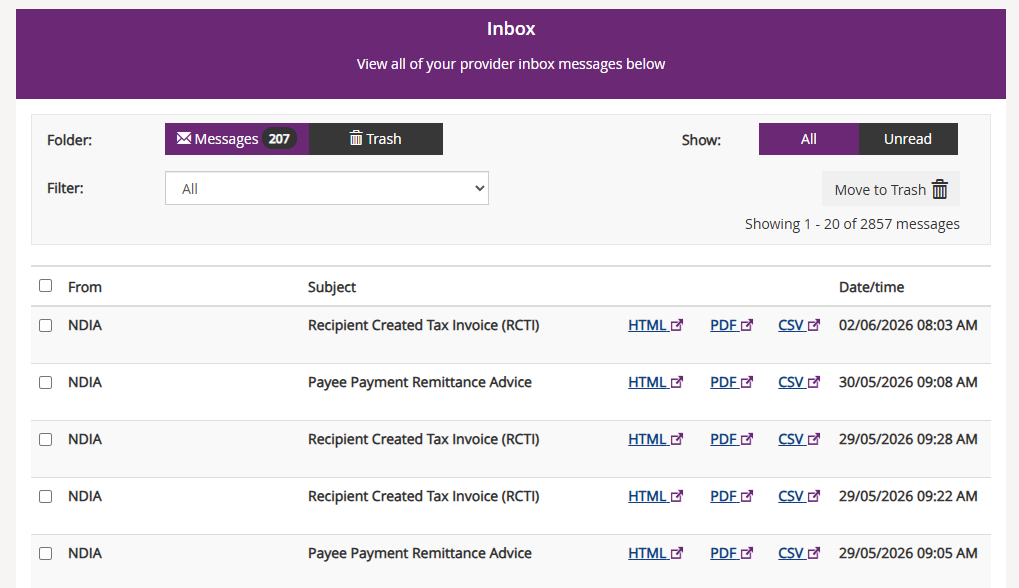
Step 1: Download the remittance. Log into the NDIS Provider Portal and download the PDF or CSV.
Step 2: Locate invoices in Xero. For each row in the remittance, strip the NDIA suffix from the reference field to get the invoice number, then find and apply the payment against the matching invoice in Xero.
Step 3: Create the batch payment. Navigate to Accounts → Batch Payments and build a new batch — one line per invoice. For a 300-line remittance, this can take a full morning.
Step 4: Match in the bank feed. When the NDIA deposit appears, use Find & Match to reconcile it against the batch payment.
Step 5: Handle exceptions. Rejected claims, underpayments, or credit adjustments need to be resolved separately via credit notes or write-offs.
Done carefully, this process is accurate. At scale, it's slow, error-prone, and absorbs time that should be going elsewhere.
The Reference Number Problem
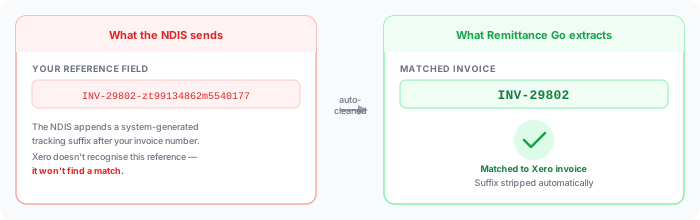
The NDIA includes your original invoice number in the "Your reference" field — but they append a system-generated tracking suffix after it.
So if your invoice in Xero is INV-29802, the NDIS remittance will show:
What the NDIS sends in the "Your reference" field
INV-29802-zt99134862m5540177
The suffix after the hyphen is an NDIA system identifier. It has no meaning to your accounts team — but it breaks any automated matching against your Xero invoice number.
INV-29802 ✓ matched in Xero
If you're trying to reconcile manually — copying invoice numbers from the remittance into Xero's search — you need to isolate the real invoice number from the suffix on every single row.
Handling NDIS Remittances Above 200 Payments
Large NDIS remittances can contain 500 or more rows. A single invoice covering a participant's week of services can appear as 6, 8, or 12 separate rows. Before anything can be posted to Xero, those rows need to be collapsed to one line per invoice.
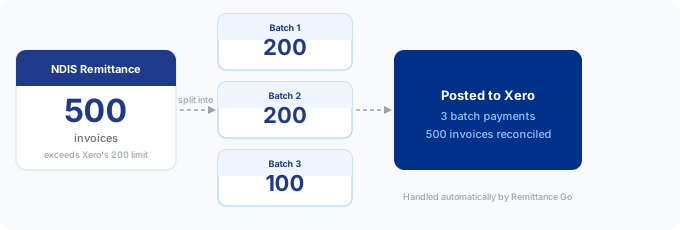
There's a second complication. Xero's batch payment API has a hard limit of 200 payments per batch. If your NDIS remittance, after grouping, still results in more than 200 distinct invoice payments, you'll need to split it across multiple batch submissions. We've covered that in detail in our guide to Xero's 200-payment batch limit.
Why NDIS Remittances Are Hard to Reconcile in Xero
The reference field doesn't match your invoices. The NDIA appends tracking identifiers to your invoice number — Xero's Find & Match won't recognise INV-29802-zt99134862m5540177, it only knows INV-29802.
Rejected claims are easy to miss. A rejected or adjusted claim appears as a negative or zero-dollar row. Miss it and your reconciliation is off, with no obvious reason why.
Volume is unbounded. A mid-sized provider might receive 200–400 line items fortnightly. Larger providers can hit 1,000+. Each line needs to be reviewed.
The NDIA pays in one lump sum. A single EFT needs to be matched against every invoice in the remittance. Xero can't do this automatically — you need to create a batch payment first.
How to Process NDIS Remittances Faster
Our NDIS remittance processing feature automates the steps that take the most time:
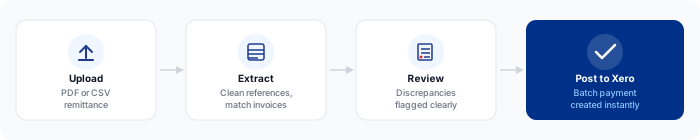
Upload the remittance — drag and drop the PDF or CSV from the Provider Portal. The software recognises the NDIA format without any configuration.
Automatic reference cleaning — the NDIA suffix is stripped from every row, the invoice number is matched against Xero, and any discrepancies are flagged for review.
CSV consolidation — for CSV remittances with hundreds of rows, the software groups claim lines by invoice number before presenting them for review. You see one line per invoice, not one line per claim.
Discrepancy flagging — rejected claims, partial payments, and unmatched references are highlighted before you post anything. You review exceptions in one pass rather than discovering them during bank reconciliation.
Batch payment to Xero — once reviewed, the batch payment is created directly in Xero via the API. The deposit in your bank feed then reconciles against it in a single click.
Providers using this workflow typically process an NDIS remittance in under 20 minutes regardless of size, compared to several hours manually.
Who This Affects
NDIS remittance reconciliation is a shared problem across a wide range of roles:

Bookkeepers and accounts receivable teams carry the bulk of the burden — opening 160-page PDFs and manually building batch payments before anything else can be reconciled for the week.
Accountants working with NDIS provider clients hit this during end-of-month cleanup. Volume and format inconsistency make it hard to delegate without close supervision.
Allied health practice managers — OTs, physios, speech pathologists, support coordinators — often process remittances themselves, particularly when claims span multiple support categories or participants.
Finance administrators at disability service organisations face the same problem at higher volume. A remittance covering 80 participants requires a reliable, repeatable process — not a manual effort each fortnight.
Common Mistakes When Reconciling NDIS Remittances
Using the full NDIA reference to search in Xero. You'll get no results. Strip everything after the invoice number before searching.
Missing rejected claims. A zero-dollar or negative row in the remittance is easy to overlook when you're processing 400 lines. Always check your totals: the sum of all accepted payments in the remittance should equal the bank deposit exactly.
Reconciling the bank deposit directly against individual invoices. If you skip the batch payment step, Xero has no record of which invoices were covered by the payment. Future reporting and audit trails will be incomplete.
Not reconciling before the next remittance arrives. NDIS payments typically arrive fortnightly. If you leave one unreconciled and the next one lands, the work compounds quickly and exceptions from both periods become tangled.
Assuming the remittance total equals what's in your bank. The NDIA payment date is not the settlement date. Funds may arrive a business day later. Always match on the actual bank deposit, not the payment date on the remittance.
Process NDIS Remittances in Seconds
NDIS remittance reconciliation in Xero is time-consuming by design — high line counts, corrupted invoice references, and a single lump-sum deposit that needs to be split across hundreds of invoices. Remittance Go handles all of it automatically: reference cleaning, line grouping, batch splitting, and posting directly to Xero.
Start free trial →