
Process PDF remittances from any insurer in seconds
We read remittance PDFs, extracts payment lines and references, and mark them as paid in Xero — no manual data entry required
Get started free →Built for Australian companies
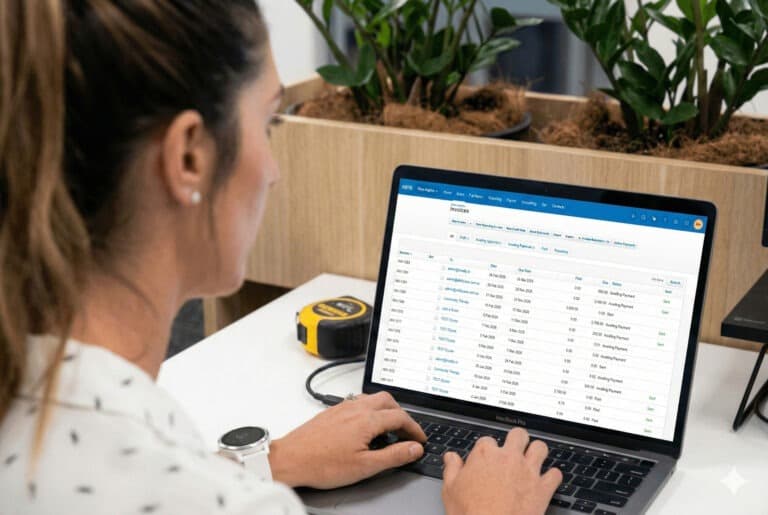
The problem hasn't changed. The stack of PDFs just keeps growing.
Every week, health fund remittances arrive in your inbox. Someone on your team opens each one, hunts for the invoice references, cross-checks them against what's outstanding in Xero, and types every payment in by hand. It takes hours. It invites errors. Paradoxically, the more patients you see, the worse it gets. A single misapplied reference creates a reconciliation mess that takes longer to unwind than it took to make in the first place.
Remittance Go eliminates the manual work entirely.
What our customers say
Hours back every week — from day one
"The reference number etc. was automatically being picked up by the system — it didn't require any manual input on 90% of the remittance, which sped up our processing time."
— Peter Casey, MVMT Rehab
Try Remittance Go for free →
How it works
Upload. Review. Done. It really is that simple.
Remittance Go takes over the moment the PDF lands. Extraction, matching, reference application, and Xero posting happen automatically — you just review what's been found and confirm.
Upload the remittance PDF
Drop in the PDF from any Australian health fund or insurer. Remittance Go reads it immediately — no templates, no configuration, no format restrictions. Medibank, Bupa, HCF, nib, and every other fund just work.
Every payment line extracted automatically
Each service claim, payment amount, master reference, and line-level payment reference is extracted and structured. Benefit adjustments, partial payments, and clawbacks are captured in the same pass — nothing is missed.
Review before anything reaches Xero
Mismatches, short payments, and unmatched references are flagged clearly on the review screen. You see exactly what will be posted — and exactly where it will go — before you confirm a single thing.
Posted to Xero perfectly
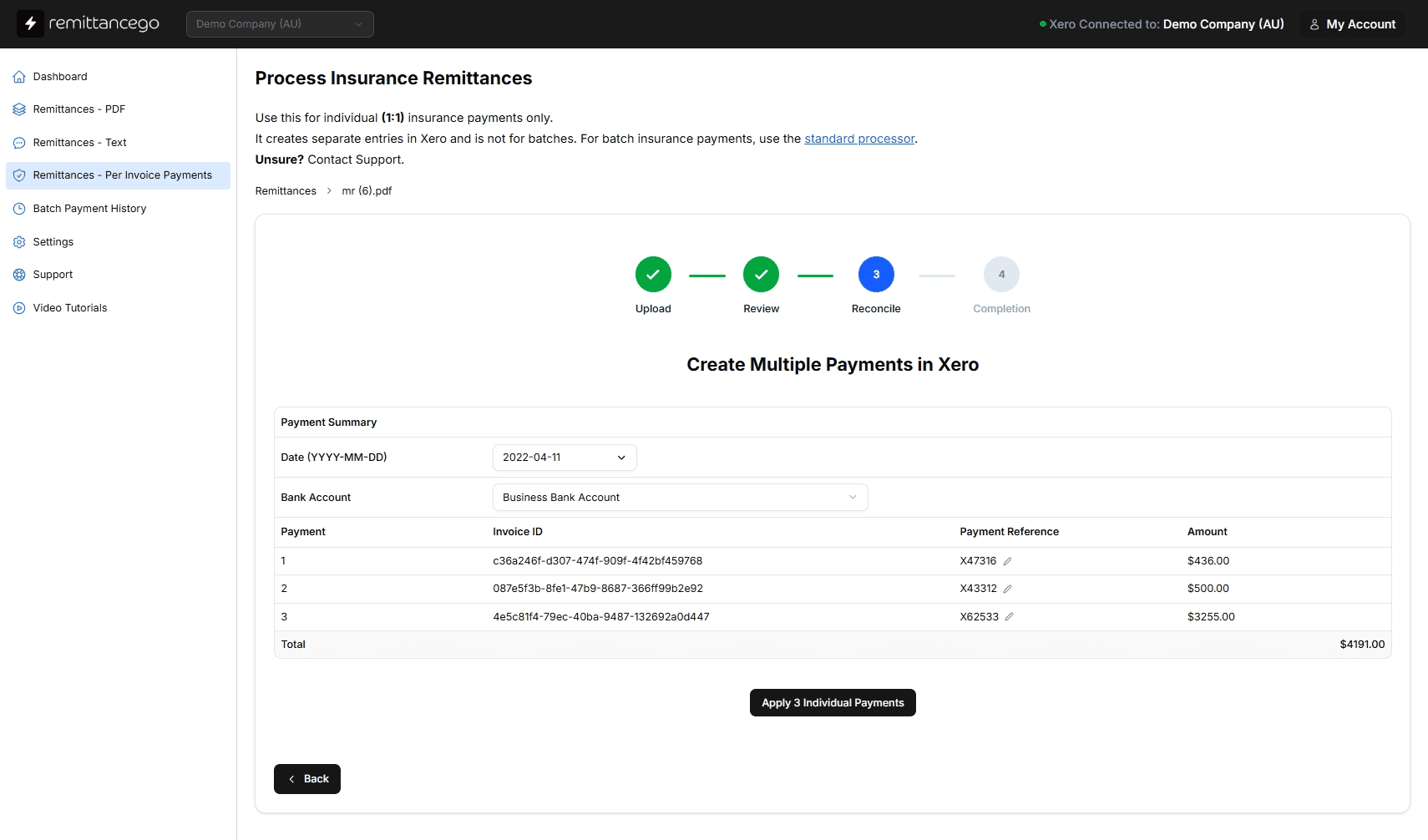
Payments are created in Xero via the official API — batch or individual, your choice. References, dates, and amounts match the remittance exactly. Your bank feed reconciliation is ready the moment it posts.
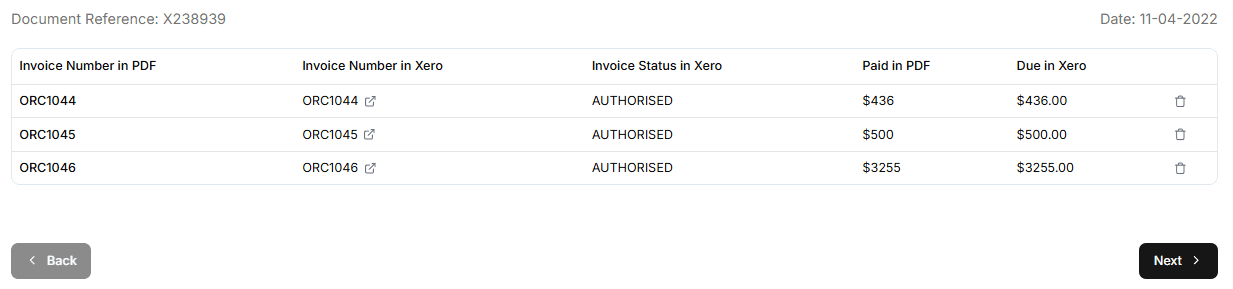
How it works
From PDF to Xero — automatically, accurately, every time
Remittance Go handles the entire remittance workflow so your team focuses on healthcare, not data entry. Works for individual practices and high-volume billing operations alike.
Every major Australian health fund — out of the box
Remittance Go processes remittance PDFs from Medibank Private, Bupa Australia, HCF, nib Health Funds, AHM Health Insurance, Australian Unity, GMHBA, CBHS Health Fund, Teachers Health, and every other Australian insurer — without any configuration.
Each insurer formats their remittances differently. Remittance Go adapts to all of them. If it's a remittance PDF, it gets read.









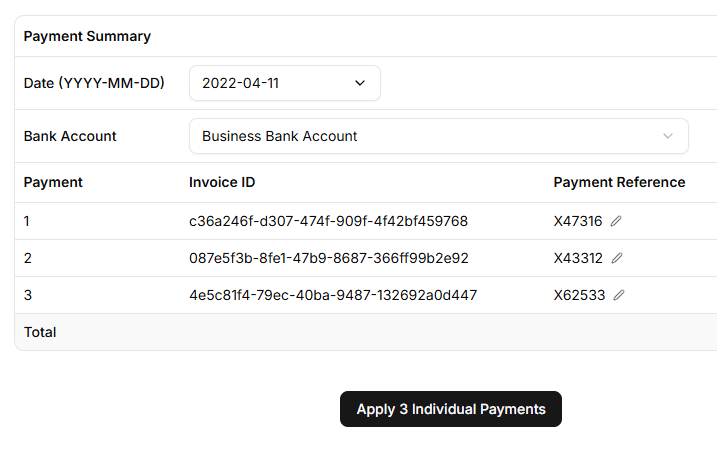
References read precisely — so Xero is always accurate
Health fund remittances include both a master payment reference and individual line-level payment references. Most manual processes drop one or both. Remittance Go reads both and applies them exactly as they appear on the remittance — so every invoice in Xero is matched to the right payment, with the right reference.
Partial payments, benefit adjustments, and clawbacks are captured in the same pass. Nothing is posted until you've reviewed and confirmed. The result is a Xero record that's a perfect reflection of the remittance — no clean-up required.
Batch payments or individual payments — you decide
Some practices want a single batch payment posted per remittance. Others need individual payments applied against each invoice for cleaner reconciliation. Remittance Go supports both models — and the choice is made per remittance, not locked to an account setting.
Either way, what lands in Xero is identical to what you'd create manually — correctly named, correctly dated, correctly referenced, and ready to match against your bank feed.
“The reference number etc. was automatically being picked up by the system — it didn't require any manual input on 90% of the remittance, which sped up our processing time.”
Frequently asked questions
Which Australian health funds does Remittance Go support?
Remittance Go works with remittance PDFs from every major Australian health fund — including Medibank Private, Bupa Australia, HCF, nib Health Funds, AHM Health Insurance, Australian Unity, GMHBA, CBHS Health Fund, and Teachers Health. Because the platform requires no templates or configuration, it adapts to each fund's format automatically. If you receive remittances from a fund not listed here, it will still work.
Does it handle both batch payments and individual payments?
Yes. You can create a remittance as a single batch payment in Xero, or as individual payments applied against each invoice — depending if the insurer has paid seperately or as one installment. Importantly, you make that choice per remittance.
How does Remittance Go handle payment references?
Health fund remittances typically carry two types of references — a master payment reference for the overall payment, and individual line-level references for each service claim. Remittance Go reads and captures both, so every invoice in Xero is matched with the correct reference exactly as it appears on the remittance. This eliminates the most common source of reconciliation errors in manual processing.
What happens with partial, underpayments, or overpayments?
We flag this for you. We simply check the amount paid against the outstanding amount in Xero and provide a warning, which is either "underpaid, "split payment" or "overpaid". This is a nuanced topic and we have tutorials about it.
Who is Remittance Go built for?
Remittance Go is built for Australian companies that receive payments from health funds and insurers — including medical centres, allied health practices (physiotherapy, psychology, occupational therapy, dental, and more), hospital billing teams, and healthcare group finance functions. It's used daily by CFOs, practice managers, accounts receivable staff, and billing admins managing multiple providers. If you're processing health fund remittances in Xero, it's built for you.
Is it suitable for high-volume operations?
Absolutely. Remittance Go was designed with high-volume teams in mind. Whether you process a handful of remittances per week or hundreds per day, the workflow is identical and the platform doesn't slow down. High-volume teams — billing admins managing multiple providers, large allied health groups, hospital AR teams — typically see the largest time savings, because the hours of manual work compress to minutes regardless of volume.
Does it work with Xero?
Yes — Xero is the native destination for every remittance processed through Remittance Go. Payments are created directly in your connected Xero organisation via the official Xero API. The result is correctly named, correctly dated, correctly referenced, and ready to reconcile against your bank feed. There's no import step, no CSV to wrangle, and no manual entry.
Is there a free trial?
Yes. You can start processing remittances for free — no credit card required. Connect your Xero account, upload your first remittance, and see the result before you commit to anything.
Your team shouldn't be typing remittances into Xero by hand
Start free. Process your first remittance in minutes. No credit card required.